


Distractions do not show up at random. They follow routines. Social feeds creep in during work hours, news tabs open when focus starts to slip, while streaming sites somehow appear late at night when the plan was an early finish. That is why time-based website blocking matters.
Manual blocks help for a minute, then habits take over. This is where structure changes things. Learning how to schedule blocking websites lets the rules do the work for you. No constant willpower or repeated decisions required. All you need to do is set limits that turn on and off when they are supposed to. Asking can I schedule website blocking for specific times? usually means one thing: you want boundaries that match how your day actually runs.
Why schedule website blocking
Scheduling website blocking fixes a problem that simple on off blockers never solve. That’s because distraction does not appear randomly; it follows patterns. Certain sites pull attention at the same moments every day, and relying on willpower in those moments rarely works. Time-based rules move control away from impulse and into structure. Here are the top reasons scheduled blocking changes how people work and think online:
Protects focused work hours
Dedicated work rarely fails because of big interruptions. It fails because of small ones. A quick check turns into ten minutes. Ten minutes breaks momentum.
Scheduling blocks during work or study hours keeps those cracks sealed. Once the block is active, attention stays where it should be. Reminders or constant self control are not the main requirements here. Just protected time that lets deeper concentration happen naturally.
Reduces decision fatigue
Every choice carries a cost. Deciding whether to block a site, delay it, or allow a quick visit may seem small, but those decisions add up fast.
A schedule removes them altogether. You decide once, then move on. The rules run quietly in the background, saving mental energy for tasks that actually matter instead of managing temptation.
Builds healthier digital habits
Habits depend on repetition. When the same websites are blocked at the same times every day, your brain adjusts. Focused hours start to feel normal.
Distraction loses its pull during those windows. Over time, checking certain sites during work hours stops feeling automatic. The routine does the training for you.
Separates work and personal time
Blurred boundaries create guilt on both sides. Work feels unfinished during personal time, and personal browsing seeps into work hours. Scheduled blocking puts clear edges back in place.
Productivity tools and work sites stay open when needed. Leisure platforms return later without friction. This separation supports balance without forcing constant restraint.
Reduces stress and overwhelm
Crowded digital environments exacerbate stress, especially early in the day or late at night. Notifications, feeds, and endless updates compete for attention when the mind is most vulnerable.
Time-based blocking limits exposure during those periods. Mornings become calmer. Evenings slow down. Less noise leads to steadier routines and more control over pace.
Supports goal-oriented routines
Goals are easier to follow when the environment supports them. Writing, studying, planning, or creative work all benefit from structure.
Scheduled blocking matches your day with your priorities instead of your mood. Even on low energy days, the system holds the line and keeps routines intact.
Removes possible loopholes
Manual blockers rely on discipline at the worst possible moment. When temptation hits, overrides are one click away.
Scheduled rules activate automatically. There is nothing to decide and nothing to disable in the heat of the moment. Limits stay in place, and consistency wins out.
How to schedule website blocking using BlockSite
If distractions tend to creep in even when you have the best intentions, BlockSite was built for exactly that situation. It gives you consistent control over distracting websites without forcing you through a long or technical setup. Once the site blocker extension is configured, it works quietly in the background while you get on with your day.
BlockSite combines two simple ideas. The first is list-based blocking. The second is time-based control. Together, they allow you to decide what gets blocked and when, without constant manual input.
Start by creating your block list. This is where you define the websites that usually pull your attention away. For most people, that includes social media platforms, streaming services, news sites, or any page that seems harmless but quietly eats up time. Add each domain to your list inside BlockSite. Think of this step as setting your boundaries before the schedule comes into play.
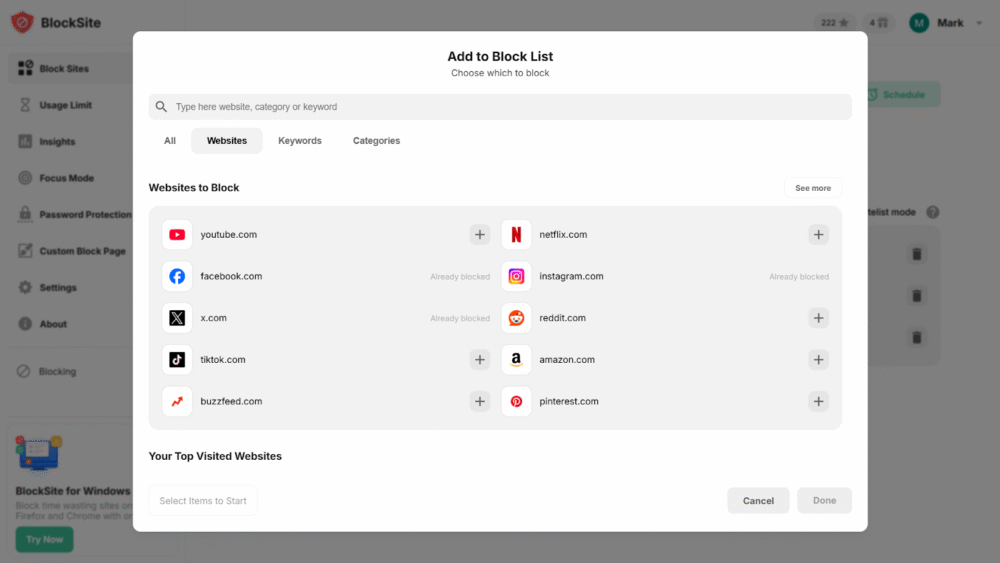
Once your list is ready, open the Schedule option inside the app. This is where things become easy-peasy.
Clicking Schedule opens a dialog that lets you define exactly when blocking should happen. You can set broad windows, such as blocking from 9 AM to 5 PM during work hours. Or you can create smaller focus blocks throughout the day, like an hour in the morning or a short session in the afternoon. The setup stays clear and straightforward, with start times and end times laid out visibly.
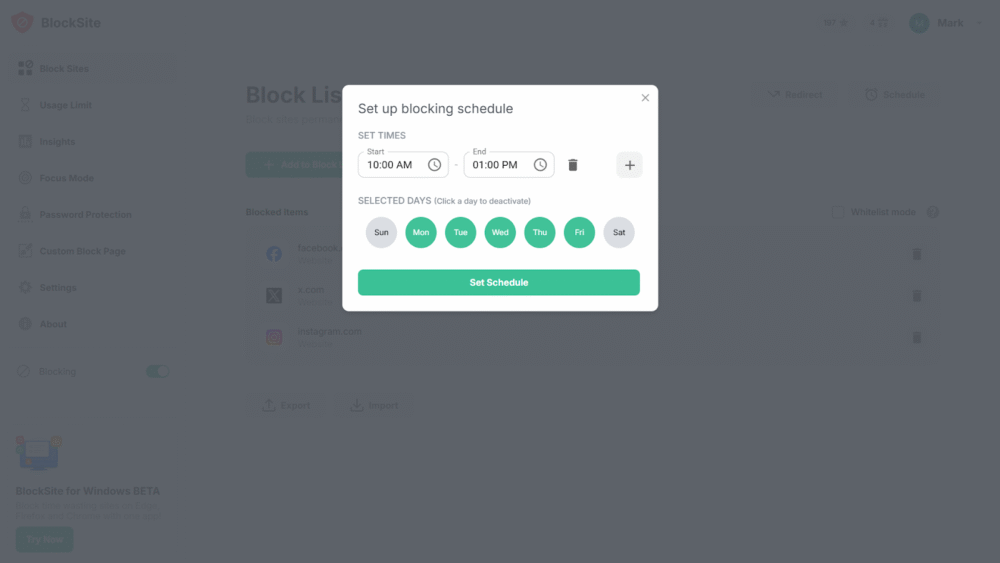
The scheduler also lets you choose which days the rules apply. This makes it easy to separate weekdays from weekends or create different routines for different parts of the week. For example, you might block social sites during workdays while leaving weekends more open. Everything stays under your control.
After choosing your time range and selected days, click Set Schedule. That is it. From this point forward, BlockSite activates blocking automatically based on the rules you created. There is no need to remember to switch anything on or off. When the scheduled time arrives, the blocks apply. When it ends, access returns.
One of the strengths of scheduling is flexibility. Routines change and so do workloads. What made sense last month might feel too rigid today. BlockSite makes it easy to revisit your schedules and fine tune the days or hours as needed. Small adjustments help keep blocking practical rather than restrictive, which makes it far more likely to stick.
Set it once, adjust when needed, then let the schedule do the work.
Scheduled blocking turns focus into a system rather than a struggle
Instead of relying on willpower each time a distraction appears, you decide the rules once and let them run in the background. When limits line up with your daily rhythm, staying on task feels lighter and far more predictable.
Think about how your day actually works. There are hours meant for dedicated work and others meant for breaks, social time, or recovery. Scheduled blocking respects that reality. It keeps distracting sites out of reach when attention matters most, then steps aside when focus is no longer required.
BlockSite helps translate your intention into routine. Set the schedule, walk away, and get on with your day. Over time, real focus stops feeling fragile and starts feeling built in.
FAQs
Can I schedule website blocking at specific times of day?
Yes. Scheduling website blocking is built for exactly this situation. With BlockSite, you decide when distractions are allowed and when they are not. You can block social media during work hours, study sessions, or late at night, then allow access again once that window closes. Instead of switching blocks on and off all day, your rules run quietly in the background. It fits around your routine rather than forcing you to manage it constantly.
How does scheduled blocking work?
The setup is pretty simple. You select the websites or apps you want restricted, then choose the time range and days when the block should apply. Once the schedule begins, access is automatically cut off. When the set period ends, everything unlocks on its own. There is no need to recall any passwords, toggle settings, or keep checking the clock. The schedule handles it for you.
Can I have different schedules for work and personal time?
Yes. You are not limited to a single routine. BlockSite allows multiple schedules to run independently. You might set a strict weekday block during work hours and a lighter setup for evenings or weekends. Each schedule has its own rules, which makes it easier to stay focused when you need to be and relaxed when you do not.
Will scheduled blocking work across all browsers and devices?
Yes. Your schedules sync across supported browsers and mobile devices. That means the same rules apply whether you are on a laptop, phone, or tablet. Opening a different browser does not bypass the block. Your focus time stays consistent across devices.
What are the benefits of scheduling website blocking?
Scheduled blocking supports better concentration and reduces mental fatigue. When you remove these distractions and stop wasting time on internet during important hours, you rely less on willpower throughout the day. This can help improve productivity, simplify decision making, and create clearer boundaries between work and your personal time.
Can I temporarily pause or edit my schedule?
Yes. Schedules can be paused, edited, or disabled at any time. If plans change or you need temporary access, adjustments take only a few clicks. You keep full control without needing to delete your setup or just rebuild it later.