


The internet is a complicated resource. While it’s become one of the greatest tools for info and enjoyment, it’s also a place where people could get lost or in danger.
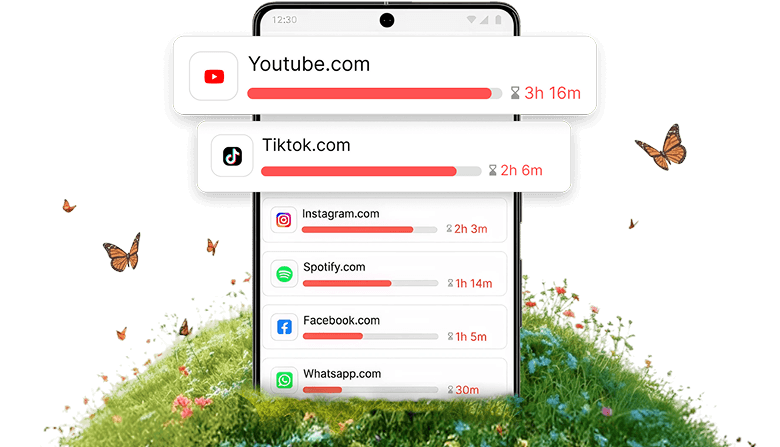
Information-harvesting platform DataReportal published its yearly Global Overview Report, showing that web users between 16 to 64 years of age waste around six hours and 40 minutes every day surfing the net using different gadgets
As this pattern continues, we are seeing an intense necessity for website blocking especially in academic and office settings.
Why Is It Important to Block Websites?
Why do we even bother to block websites? What’s the point? Well, for one, it’s important for a few reasons:
Increasing Productivity in Work and Education
One of the most important reasons is productivity. In both workplaces and schools, having access to every website known to man can be quite distracting. It’s easy to find yourself spending more time scrolling social media or watching YouTube rather than doing your actual job. By learning how to block distracting sites, people are able to stay on task and get things done in a much faster manner.
Ensuring Online Safety for Kids
Another reason why blocking websites is important is because it protects those who aren’t capable of protecting themselves yet — kids. The internet has its fair share of inappropriate content that no sane parent would want their child seeing. Sites that host adult content, promote violence or extremism, or facilitate cyberbullying are very real and dangerous threats to our youth. And that’s why parents rely on website blockers; they’re essentially creating safer spaces for their children through software.
Promoting Mental Well-being Through Limited Exposure
Lastly, this kind of software promotes a healthier lifestyle by limiting exposure to certain things. Too much exposure — especially with harmful content — can damage someone’s mental health beyond repair sometimes. That might seem like a stretch but it really isn’t; think about it:
- Constantly seeing bad news online
- Being exposed all the time to everyone else’s perfect lives across social media
- Browsing through news sites only reading negative headlines
All of these have an effect on us whether we realize it or not. So instead of letting ourselves be bombarded by constant negativity 24/7, these kinds of programs help us maintain that nice balance we all strive for on the web.
The Most Blocked Websites
Here’s a list of sites that are most commonly restricted. These top 10 blocked websites are notorious for being distracting and disruptive to work environments. Blocking these common sites is one way to increase focus and keep workers safe:
YouTube
The site that has more videos than there are people in the world. It’s easy to get lost on YouTube, leading to long hours of browsing when you should be working or studying. The vast array of available content, from educational videos to endless entertainment, makes it a primary candidate for blocking.
Everyone’s favorite social media platform. Besides keeping up with friends, Facebook is a place where news gets consumed, however, it’s addictive and keeps users from getting done what they need to be doing. This is why understanding how to reduce time on social media, like Facebook, is crucial for maintaining productivity and focus.
People can lose track of time scrolling through Twitter’s (now called X) constant updates and information. Checking out these never-ending tweets can greatly impact productivity. And because of such time-consuming distractions, this site is usually included on the top blocked sites list.
A place with so many communities that no matter who you are, you can find somewhere to go down the rabbit hole. It’s hard not to spend hours here. Its wide range of topics and active discussions can easily get you out of focus. This is the primary reason why Reddit is often blocked in schools and universities.
Netflix
With their extensive library of movies and TV shows, Netflix can quickly turn a short break into a multi-hour binge session. It’s also a major temptation for procrastination. A lot of users choose to block this streaming site to avoid these distractions, especially during work or study hours.
Roblox
This popular online gaming platform is infamous for its ability to suck kids in for hours on end. Naturally, parents and teachers block it for this very reason. Its interactive and immersive features makes it a common site on parental control lists.
A visually rich space that also has some networking features. This website is attractive but also a significant time sink if you aren’t careful. You might find yourself spending extended periods browsing through photos and stories. Such actions can interfere with productivity and this is the reason why it’s included in this list.
TikTok
You start watching one video…then another…and another…and before you know it three hours have passed by in what feels like 15 minutes! TikTok’s short and addictive videos make it easy for viewers to lose track of their time. Blocking this site is a common strategy to avoid these distractions, particularly among younger users.
PornHub
This is currently one of the most popular and biggest adult content sites and is frequently blocked for obvious reasons. This domain is commonly restricted in parental controls to keep minors from accessing inappropriate content. Disabling access to this site is important to maintain a safe and appropriate online environment.
Amazon
The best shopping experience one could ask for according to millions of consumers around the world. However, this site can be a major distraction during work hours. This site must be blocked sometimes in order to keep employees focused on tasks at hand.
How Did We Choose the Top Blocked Sites?
The list of top blocked sites was generated through a rigorous process that analyzed user behavior and online trends:
Traffic Analysis
First, we took a good deep look at website traffic. We focused on finding sites with high user involvement. Often these sites are massive distractions.
Content Evaluation
Then, we looked at the type of content these high-traffic sites had to offer. We wanted to pick out the websites, especially ones that offered entertainment, that are most likely to consume large amounts of time.
User Feedback Integration
Finally, feedback from different users was taken into account. These users ranged from parents and educators to professionals in various fields. Their real-world experiences were essential for making sure our list accurately reflected the sites people find to be the most disruptive.
How to Block Websites via Blocksite?
Blocking websites is a breeze with BlockSite. The tech-savvy and the less experienced can all follow these instructions. Here’s a step-by-step guide:
Step 1: Download and Install BlockSite
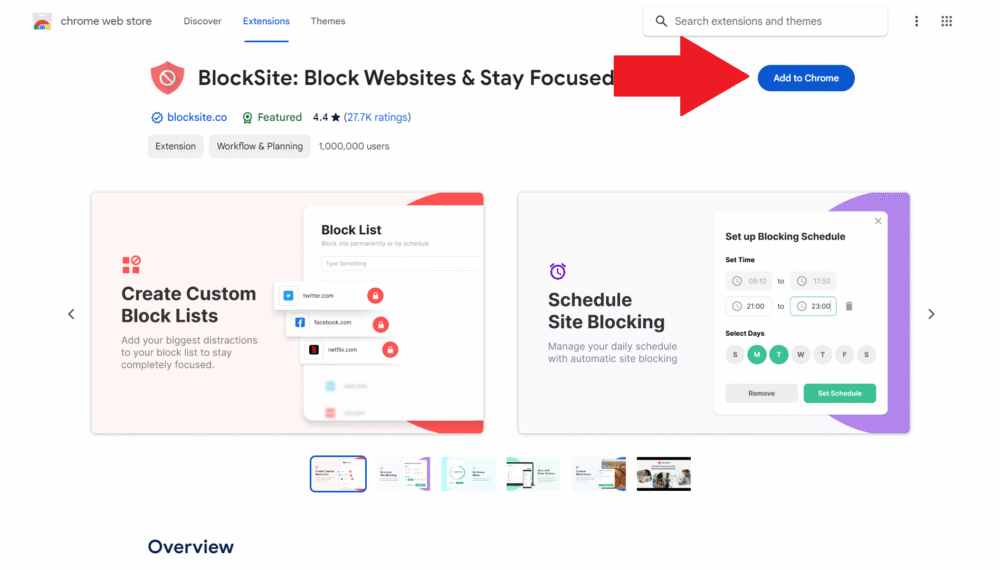
Head over to the official website of BlockSite. You’ll find a button that lets you download the app onto your device. Choose between smartphone or computer versions depending on what you’re running. From there, follow the installation steps.
Step 2: Open it Up
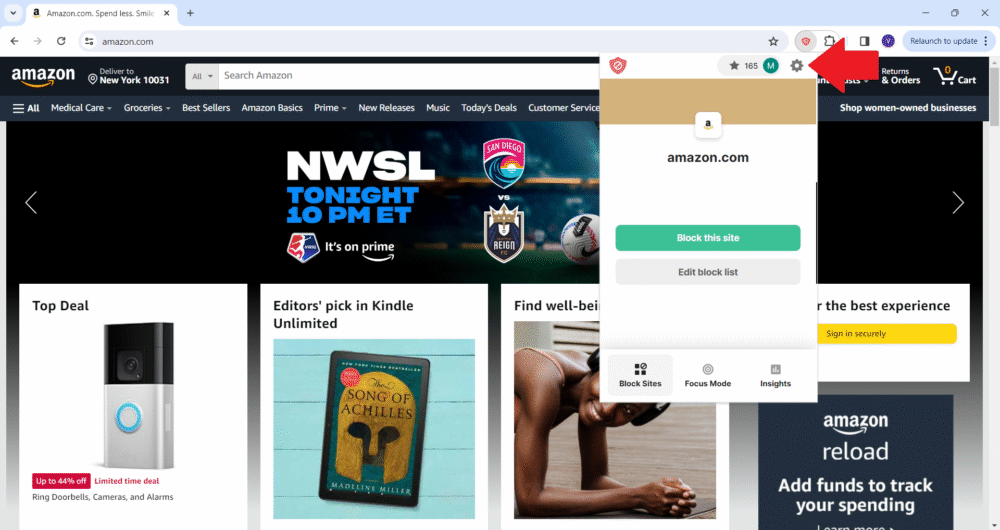
Get ready to launch it for the first time once you’ve finished installing. If you’re new to using this program, some prompts may ask that you grant permissions or set up a browser extension. Then, click on the wheel icon to access the settings or dashboard.
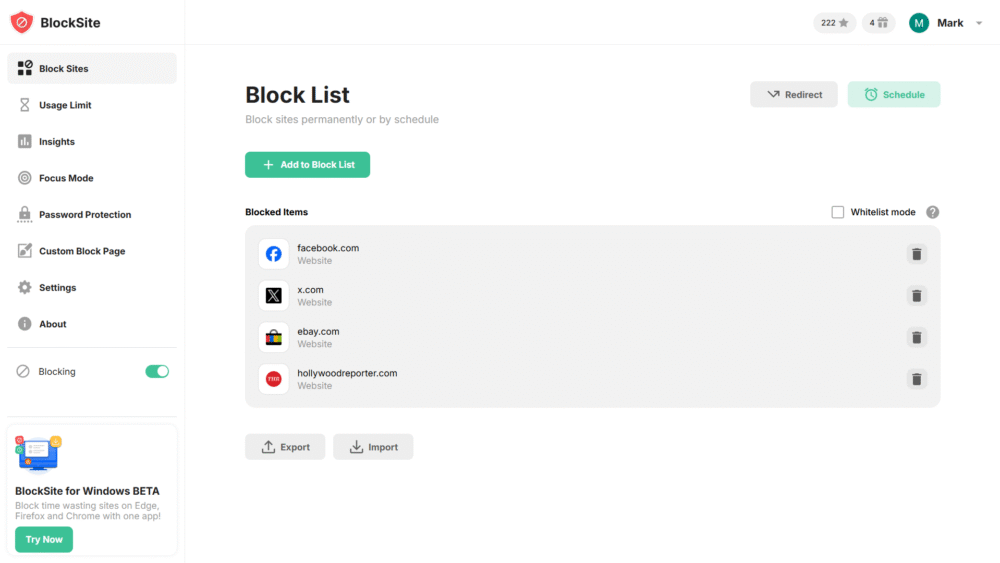
Step 3: Put in URLs
Take the time here to enter each site’s URL into the Block List. Make sure not to mess them up so no other site gets blocked by accident! Add as many sites as necessary, since BlockSite will block them across every browser you have installed on your device(s).
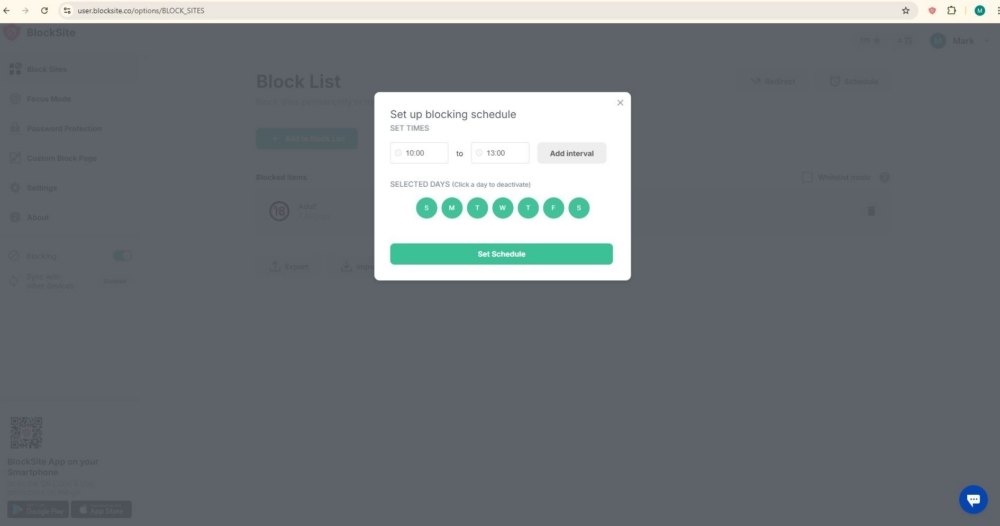
Step 4: Set Your Schedule
BlockSite also lets users get specific about when they want certain sites blocked. For example, maybe it’s only during work hours or school hours for kids? It’s all about flexibility, which helps make sure that customization isn’t completely thrown out just because you want access denied.
Step 5: Start Browsing
After setting everything up, you or anyone trying to visit any of those sites during specified hours simply won’t be able to reach them. Come back anytime later if anything needs changing!
[Make productivity your priority – install BlockSite to block distracting sites!]
The Perfect Balance of Work and Play
It’s no secret that the internet is loaded with distractions. But it’s also not a secret that there are tons of measures in place to keep people safe as they surf the web. One of those tools is BlockSite, and it does more than protect you from dangerous sites — it also helps you stay productive.
This tool gives users the ultimate power to control their online experience by blocking websites entirely. In schools, workplaces, and even at home, it acts as an incredibly helpful safety net. By limiting access to certain sites, you can work without distraction in any environment.
For parents, this tool is a must-have when protecting their kids from inappropriate content. As the internet becomes increasingly integrated into daily life, it’s crucial for everyone to have a handle on their digital experience. With tools like BlockSite on your side, you’ll be able to unlock your full potential while staying safe online.
FAQs
Can I block websites on all devices?
Yes! You can use website blockers such as BlockSite to do this. These are designed to work on any device. There is no reason whether you’re using a smartphone, tablet or computer that they won’t be able to block access to any specific sites. This is helpful for people who are trying to stay disciplined with their own habits, parents who are trying to protect their children from things they shouldn’t see or organizations that want data rules.
Is website blocking effective for children?
Absolutely! It’s crucial for keeping kids safe online. By restricting what they can and cannot go on, you’re limiting their chances of coming into contact with something inappropriate or harmful. It goes far beyond just blocking adult content. It also helps maintain exposure to cyberbullying, online predators and other risks that lurk in the depths of the internet. You should still be educating your child about responsible internet use at the same time though!
Can blocked websites be unblocked easily?
It all depends on the website blocker you choose but there are usually features available like password protection and administrative controls that prevent unauthorized changes being made when it comes to blocked sites lists. So rest easy knowing it’ll take a good amount of effort for someone to bypass your restrictions!
Do website blockers affect internet speed?
Not at all! They are specifically designed not to have an impact on your overall speed. Instead of slowing down your connection, website blockers will intercept requests when you attempt to go onto a blocked site and simply make sure it doesn’t load.
Are there legal implications to blocking websites?
In most cases, no. Many organizations already employ this method in order to increase productivity around the workplace or school grounds so don’t worry too much about backlash if this was something you were planning on doing at home too. However, always double-check local laws before implementing anything like this particularly if it’s going beyond personal use or private networks.