





Can productivity tools help in team collaboration? In most teams, the problem is not that people refuse to work together. It is that work gets scattered across tabs, messages, meetings, and “quick checks” that turn into long interruptions. Over a week, that adds up to missed updates, late handoffs, repeated questions, and uneven workload.
Do productivity tools improve team collaboration? Yes they can, but only when they support the way the team already works: clear communication, visible priorities, fast access to the right info, and consistent follow-through. There is also a quieter factor that gets ignored: attention. When a team depends on quick replies, clean handoffs, and focused work blocks, one distracted person can slow down others.
What teams actually need to collaborate well
Collaboration is a system. It works when the team shares the same picture of what matters today, what is changing, and who owns the next step. Tools can help, but the needs come first.
Clear communication
Teams need messages that are easy to understand, easy to act on, and hard to misinterpret. When details get lost or expectations stay vague, people fill gaps with assumptions. That is one reason miscommunication is repeatedly linked to delays, rework, and lower quality in project settings.
Clear communication also depends on timing. An update that arrives too late can be as harmful as no update at all. Remote and hybrid work adds more async moments, which raises the value of short written updates, decision notes, and visible status changes. Remote work can also reduce cross-group connections and increase siloing, which makes clarity and intentional communication even more important.
Shared visibility into tasks and goals
Teams collaborate better when everyone can see what is being worked on, what is blocked, and what “done” means. Shared visibility reduces duplicate work and helps people prioritize based on team goals instead of personal guesswork.
This is also why many work management systems push status signals like “in progress,” “needs review,” and “blocked.” When those signals are missing, collaboration shifts into private DMs and meeting follow-ups. Teamwork is something that needs defined ways of working and shared responsibility across roles.
Easy information access
Teams lose time when important files, decisions, and instructions are hard to find. People ask the same questions, repeat investigations, or wait for someone who “knows where it is.” Some collaboration vendors argue that information search takes a large chunk of the workweek, and that silos slow execution. Even if specific numbers vary by study and role, the pattern is consistent: slow retrieval leads to slow decisions.
Information access is also a trust issue. If the team does not trust that the current doc is current, or that the latest decision lives in one place, they stop relying on shared systems and move back to personal notes.
Smooth handoffs and accountability
A handoff is where collaboration often breaks. The best handoffs are specific: what changed, what is needed next, when it is due, and where the supporting info lives. Accountability also needs to feel fair. That means clear owners, clear deadlines, and a visible place to confirm completion.
Project communication issues often mention misunderstandings about scope and expected outcomes as a recurring source of trouble, especially when stakeholders have different assumptions.
Minimal hassle in daily work
Even good teams struggle when the day is full of interruptions: too many tools, too many notifications, and too many places where work can hide. This is often described as tool fatigue or app overload, where constant switching makes it harder to keep attention on the task at hand.
This matters for collaboration because switching costs do not stay personal. When someone loses focus, they reply later, review later, and deliver later. That delay becomes someone else’s blocker.
How do productivity tools support collaboration? They support it when they help people communicate clearly, find what they need quickly, and deliver on commitments without getting pulled off task every few minutes.
How productivity tools impact collaboration
How productivity apps impact collaboration is easiest to notice in the small moments: writing a status update instead of doomscrolling, reviewing a teammate’s work without jumping to entertainment sites, and finishing a handoff before the next meeting.
BlockSite is a reliable web tool for productivity that can help teams collaborate better by protecting focus, reducing distraction loops, and supporting consistent follow-through.
Focus Mode
Focus Mode is built to prevent distractions during a set time period. This can map nicely to team collaboration patterns like sprints, work blocks, or timed sessions.
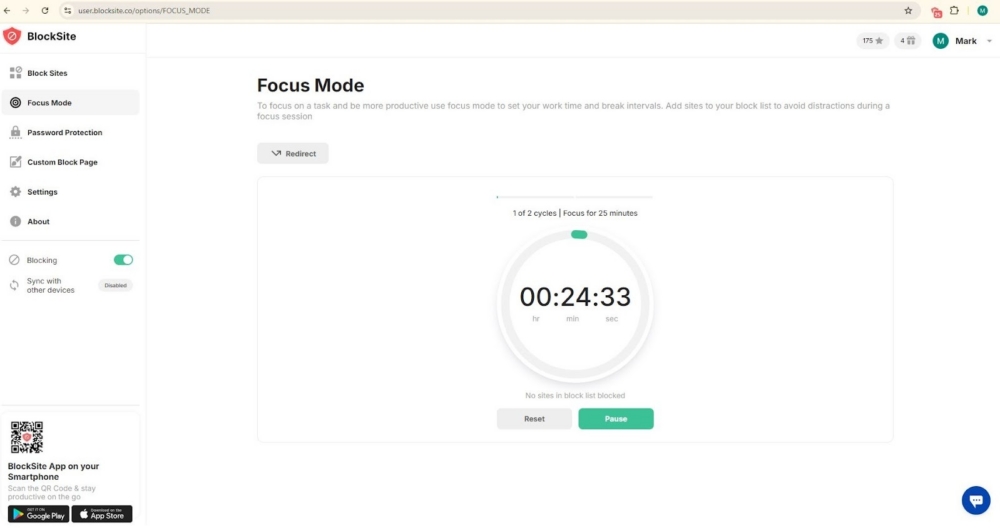
Examples:
- A 60 minute Focus Mode session before standup, so updates are written and tasks are moved before the meeting.
- A 90 minute Focus Mode block for a pair of teammates doing review and revision passes.
- A “ship it” block at the end of day for closing loops: replying, handing off, and updating statuses.
Focus Mode can also support fairness. When the team agrees to focus blocks, it reduces the chance that one person carries coordination while others drift.
Insights
This feature shows browsing trends over time. Insights can support collaboration by making patterns visible without blame.
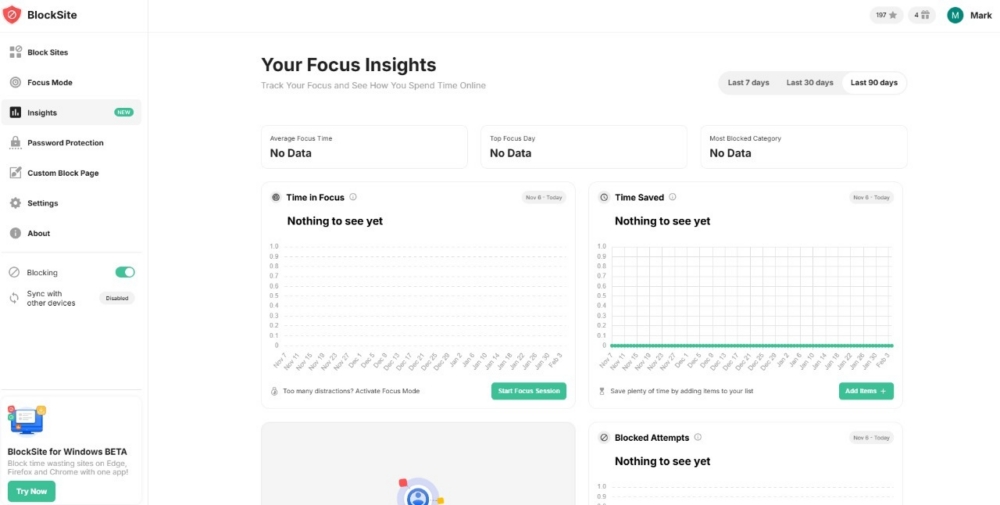
Individuals can spot which sites break focus during collaboration-heavy times like review windows or response blocks. People can experiment with schedules and see whether distraction time drops during key work periods. In addition, managers can encourage voluntary reflection: “If you miss handoff deadlines, check your own patterns and adjust.”
Insights should be used carefully. This is not a surveillance feature for teams. It is a self-awareness tool that can support personal reliability, which then supports team reliability.
Block sites by keyword or category
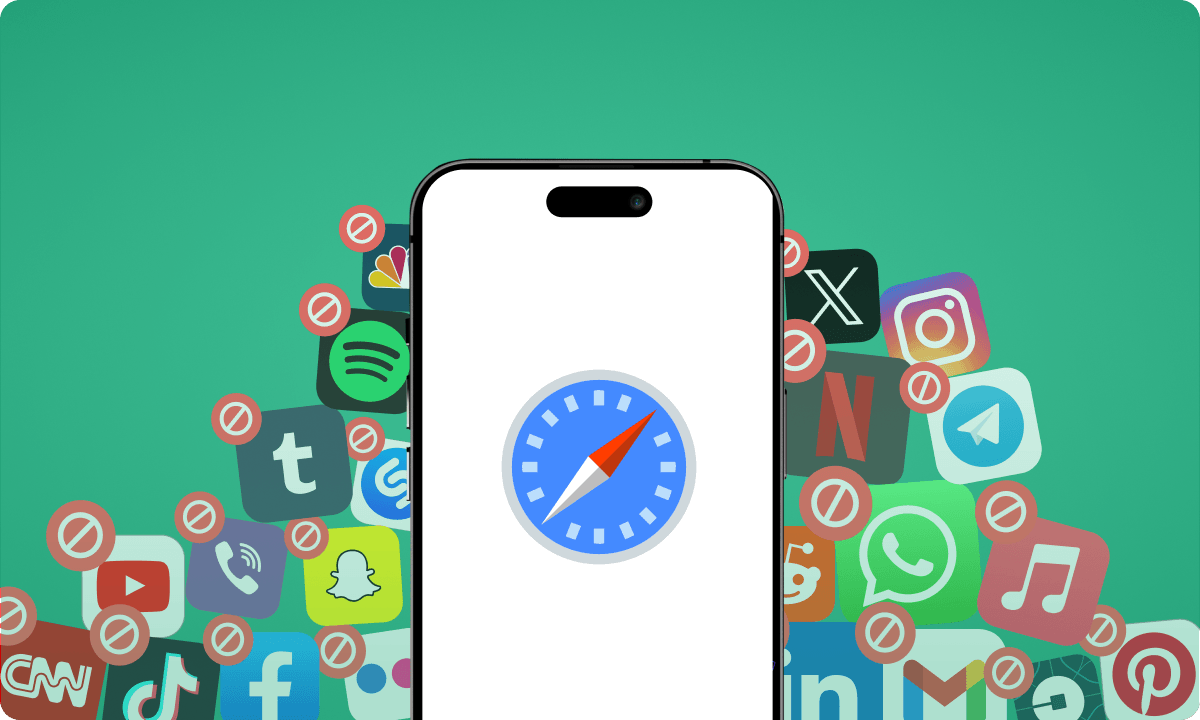
BlockSite lets users block distractions in bulk by category, or block multiple sites and apps by keyword. This is useful for teams because distractions are rarely one site. People rotate between social feeds, news, streaming, shopping, and forums. Your organization can block websites temporarily or permanently.
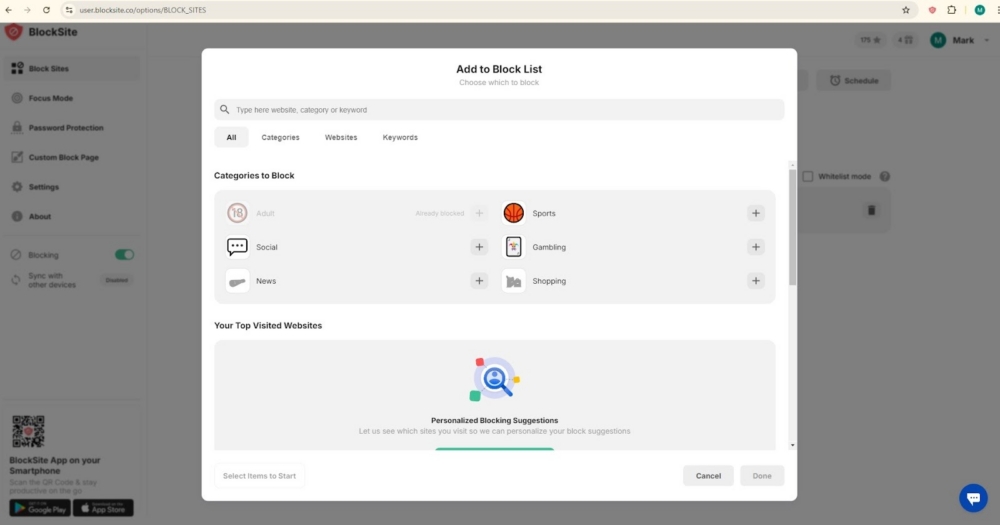
Here some examples that can benefit your team:
- A support team can block “shopping” and “social media” categories during working hours to protect response times.
- A content team can block keywords tied to habitual time sinks during writing or editing sessions.
- A developer can block categories during code review windows to reduce mistakes and speed up feedback loops.
Keyword blocking also helps with “new site” drift. If someone keeps finding new versions of the same distraction, a keyword rule can catch it sooner.
Scheduled blocking
It also supports scheduling so distractions are blocked during set hours. Scheduling supports collaboration when teams use common working rhythms.
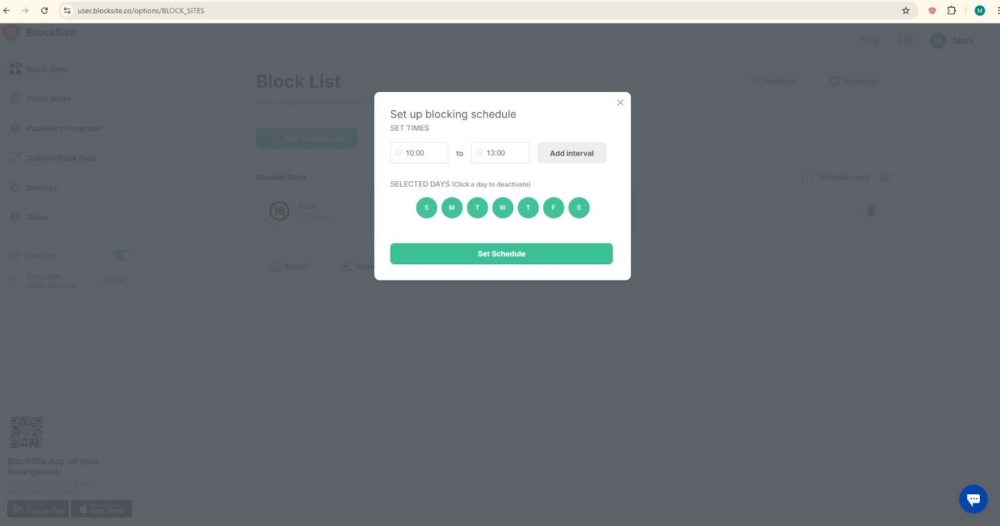
These are ways that teams can use this feature:
- “Focus mornings” where distractions are blocked until midday for deep work and delivery.
- “Review windows” where distractions are blocked during code review, QA, or editorial review blocks.
- “Meeting-light blocks” where the team protects time for building, then uses later windows for communication and coordination.
Scheduling also reduces negotiations. Instead of relying on willpower each day, the rule is already set.
Redirecting blocked pages
The tool comes with a redirect feature that can send a user away from a blocked site automatically. For collaboration, this is a simple way to turn a weak moment into a helpful next step.
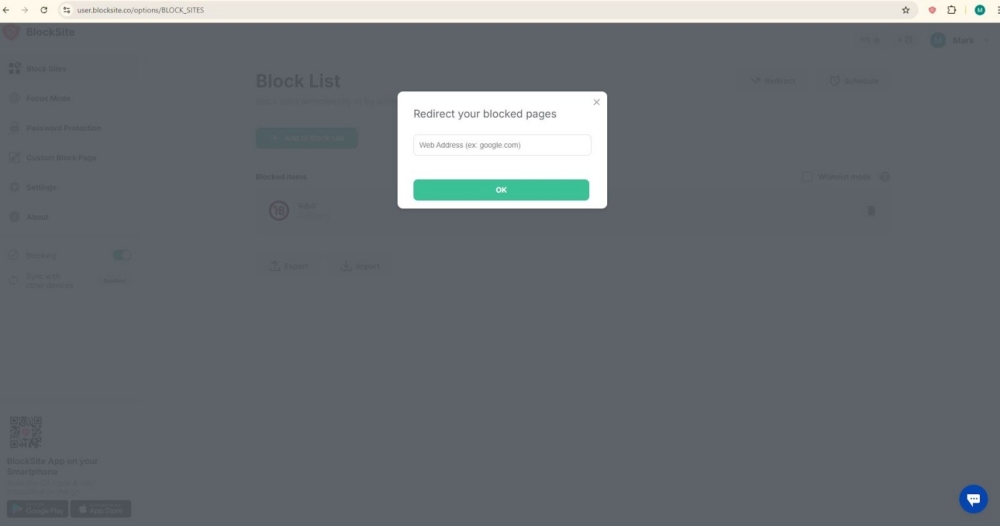
Redirects work well because they do not just stop behavior. They provide a next action that is matched with the team’s work.
Password protection
The tool offers a password protection that makes it harder to change settings in the moment. This matters because distraction often wins during stress, boredom, or frustration. Password protection helps keep the plan intact.
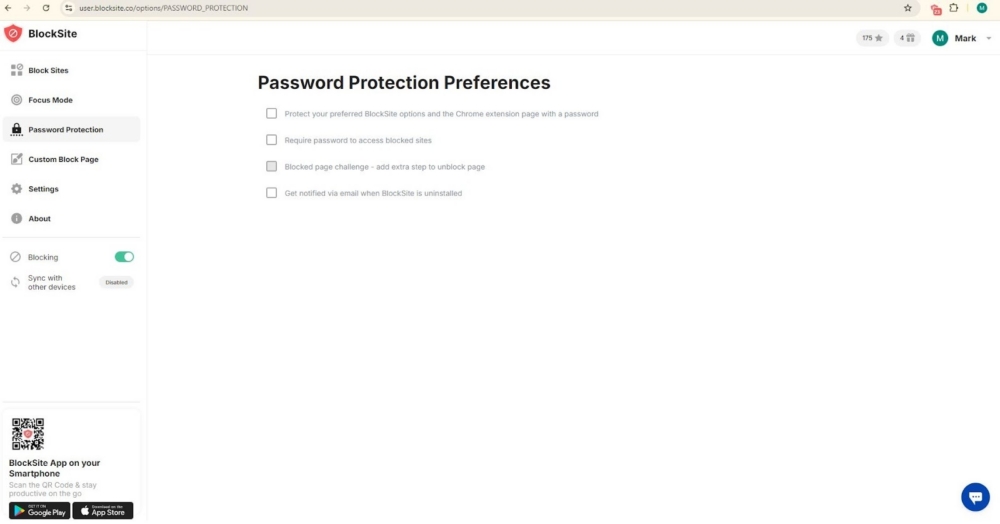
People are less likely to disable blocks during a tough task, which helps deadlines stay stable. It supports personal commitments that affect team commitments, like “I will deliver this review by 3 PM.” It also reduces the need for a manager to police focus habits. The guardrail here is personal and not social pressure.
Custom block page
There’s also the custom block page, which can show a personalized message when a blocked site is opened. For teams, this can be used as a gentle, repeated reminder of what matters right now. It also adds a layer of incentive motivation to stay on task instead of clicking away.
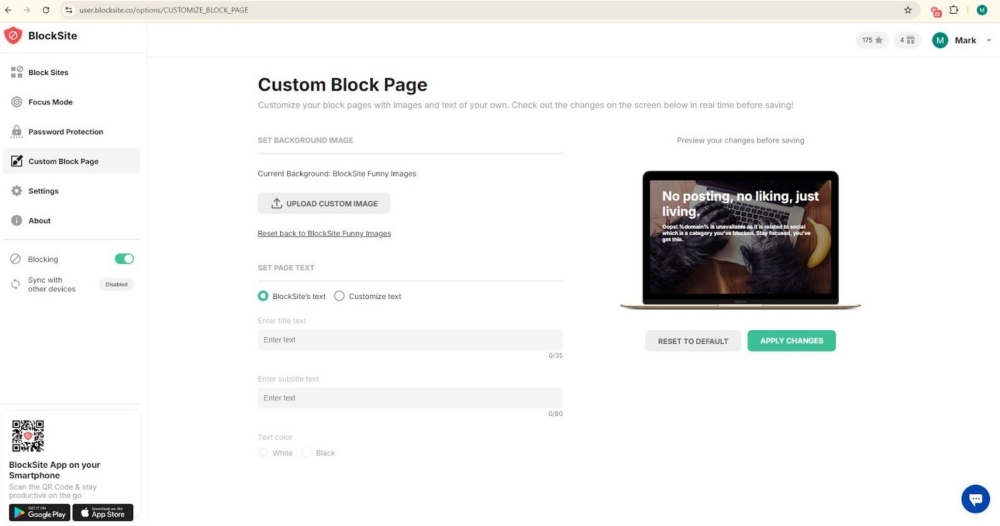
Check out these useful custom block page ideas:
- A short reminder like “Send the handoff note before switching tasks.”
- A link to a “how we work” doc for the team (handoff steps, response expectations, naming rules).
- A checklist like “Update status, notify owner, attach link, then move task.”
This works best when messages stay short and action-oriented.
Collaboration improves when focus becomes part of the system
How productivity tools affect collaboration often comes down to one question: do they help people follow through on what the team needs from them?
BlockSite helps in a simple way. It protects attention during the parts of the day where collaboration depends on it: writing clear updates, replying on time, reviewing work carefully, and finishing handoffs without drifting into distractions.
If your team already has communication and task tools in place but still struggles with missed handoffs, delayed replies, or slow reviews, this tool can be the missing support layer. Start with a few high-distraction categories. Add schedules that match your team’s working rhythm. Then use Focus Mode for the work blocks where deadlines and collaboration matter most.
FAQ
How do productivity tools enhance team collaboration?
They help by making work easier to coordinate: shared task visibility, faster access to information, clearer updates, and fewer delays. A focus tool like BlockSite supports collaboration indirectly by reducing distraction during the moments that require follow-through, like reviews, handoffs, and timely replies.
Can productivity tools reduce miscommunication in teams?
Yes. Fewer misunderstandings happen when updates are written clearly, decisions are recorded, and handoffs are consistent. Miscommunication is widely linked to project delays and quality issues in many settings, so tools and habits that support clarity can help.
What are the common mistakes teams make when using productivity tools?
Common mistakes include:
- Using too many platforms with overlapping purposes, which increases switching and missed updates
- Treating tools as a substitute for clear ownership and deadlines
- Keeping decisions in private messages instead of a shared source of truth
- Not agreeing on simple working rules (where updates go, response expectations, and handoff steps)
How can teams avoid “tool overload” and choose the right platforms?
Start by mapping which tool owns which job: chat, tasks, docs, and meetings. Reduce overlap where possible. If the stack cannot be reduced, teams can at least standardize routines and protect focus time so people can execute without constant switching.
Do productivity tools actually improve workflow efficiency or just add extra steps?
Both outcomes are possible. Tools help when they remove confusion, reduce repeated questions, and shorten the time between “question asked” and “answer delivered.” They add steps when teams duplicate work across tools or require updates in too many places. The best signal is whether cycle time improves: faster handoffs, fewer missed details, and fewer late-stage surprises.
How can teams measure the impact of productivity tools on collaboration?
Pick a few team-level signals and track them for a month:
- Response time for key channels
- Handoff completion rate (done with notes, links, and owners)
- Review turnaround time
- Rework rate due to missing requirements or unclear direction
With BlockSite, individuals can review their own browsing trends and see whether distraction drops during planned work blocks.
How do you encourage team members to adopt a new productivity tool?
Lead with a clear problem the team agrees on, like late handoffs or slow reviews. Start small with one use case, one schedule, and a short trial window. Share simple defaults the team can copy, and invite feedback after a week. Adoption improves when people feel the tool supports their day instead of adding more reporting work.



 Take back your focus