





Instagram is built for quick check-ins that often turn into much longer sessions. For many people, that means lost work blocks, broken study time, delayed sleep, and a harder time staying present offline. If you are looking up how to block Instagram, you are usually not trying to quit the internet. You are trying to stop one app and one site from eating more time than you meant to give it.
That urge makes sense. Instagram remains one of the biggest social platforms in the world. Data published in Meta’s ad tools showed at least 1.74 billion users globally in January 2025. Usage is heavy too: estimates put average Instagram time at about 32.4 minutes per day worldwide.
People usually search for ways to block Instagram for three reasons:
- First, it is easy to open automatically when you want a short break.
- Second, the mix of reels, stories, DMs, and endless scroll makes it easy to stay longer than planned.
- Third, many people want more control, not total disconnection. They still want their phone and browser for useful tasks, just without one platform repeatedly hijacking attention.
The effects of excessive Instagram use
Too much Instagram use can create more problems than most people notice in the moment. The effects often build slowly, then show up in your work, your mood, your sleep, and your ability to stay with one task.
Productivity loss
Instagram breaks concentration in small but costly ways. You open it for one notification, watch a reel, read comments, tap a profile, then come back to work with less momentum than before. Even short interruptions can make it harder to resume focused work.
The problem is not only the minutes you spend inside the app. It is also the restart cost afterward. A five-minute check can easily turn into twenty minutes, and even when it does not, your brain still has to switch back into task mode. Over a week, that can mean less output, more rushing, and more unfinished work.
Mental health effects
Heavy Instagram use can also affect emotional balance. The platform is highly visual, highly social, and highly comparative. That means people are often comparing their ordinary day to someone else’s highlight reel. For some users, that can feed insecurity, fear of missing out, and anxiety.
There is also a reward-loop problem. Social media research increasingly points to dopamine-linked reinforcement patterns, where likes, comments, novelty, and unpredictable rewards keep people checking again and again. That does not mean every user is addicted, but it does explain why “I’ll just look for a minute” often turns into repeated returns throughout the day.
A useful comparison is this: messaging a friend with a clear purpose is very different from drifting through algorithmic content with no stopping point. One is directed communication. The other is open-ended consumption, and that second pattern is the one more likely to leave people overstimulated, dissatisfied, or mentally scattered.
Sleep disruption
Instagram is also a common bedtime trap. Many people open it late at night because it feels easier than starting another task. The issue is that bedtime scrolling rarely stays brief. One story becomes another, then another, and suddenly your sleep window is gone.
Social media use around bedtime has been linked to poorer sleep quality. That can make nighttime scrolling harder to control the next day as the unhealthy pattern repeats.
Reduced focus and attention span
Instagram trains fast shifts in attention. Swipe, watch, react, move on. Over time, that can make slower tasks feel harder to tolerate. Reading, studying, writing, and deep work all ask for sustained attention, which clashes with the speed and novelty of short-form social content.
Recent research suggests that heavy digital media habits, especially media multitasking, are associated with weaker sustained attention and concentration. This does not prove Instagram alone causes attention problems, but repeated interruption and rapid task-switching can make sustained focus harder.
Blocking Instagram benefits
Blocking Instagram can create immediate relief, but the bigger value is what happens after that. Once the usual trigger is gone, it becomes easier to work with intention instead of reacting on autopilot.
Improved productivity
When Instagram is unavailable, one of the most common outcomes is fewer accidental distractions. You are less likely to turn a short pause into a long scroll. That gives you cleaner work sessions and more predictable progress.
This is especially helpful for students, remote workers, and anyone whose job depends on sustained concentration. A blocker does not do the work for you, but it removes one of the most common obstacles to getting started and staying with a task.
Better focus and time management
Instagram blocking also helps with structure. Instead of constantly deciding whether to open the app, you move that decision earlier by setting a rule. Habits are easier to maintain when the environment supports them.
For many people, a blocker works best as a time management tool. It turns vague intentions like “I should spend less time on Instagram” into a rule that actually exists on your browser or phone.
Healthier digital habits
The point is not only to cut usage. It is to change the rhythm of your day. When Instagram is off-limits during key hours, you create more room for routines that are easier to repeat. That may include reading, walking, journaling, meal prep, or other screen-free activities that help your attention settle instead of splinter.
Blocking also supports replacement habits. If your default break used to be checking Instagram, you can swap it for a short reset that does not pull you into another cycle of distraction.
Improved mental well-being
Less exposure can mean fewer comparison triggers, fewer impulsive checks, and fewer emotional spikes tied to likes, stories, or social updates. That does not solve every mental health issue, but it can reduce one recurring source of agitation.
It can also help you build a steadier start to the day. Blocking Instagram supports a stronger screen-free morning routine, where the first part of the day is used for waking up, planning, and getting moving instead of falling into content before breakfast.
Parental control advantages
For parents, Instagram blocking adds another layer of control. It can reduce exposure, limit access during school hours or bedtime, and make it harder for children to move between the app and the web version. When paired with password protection, it also reduces the chances of quick self-reversal.
How to block Instagram on a computer
If you are searching how to block Instagram on computer, the most reliable setup is to block both the site and the common workaround options, then lock the settings so you cannot undo them in a weak moment.
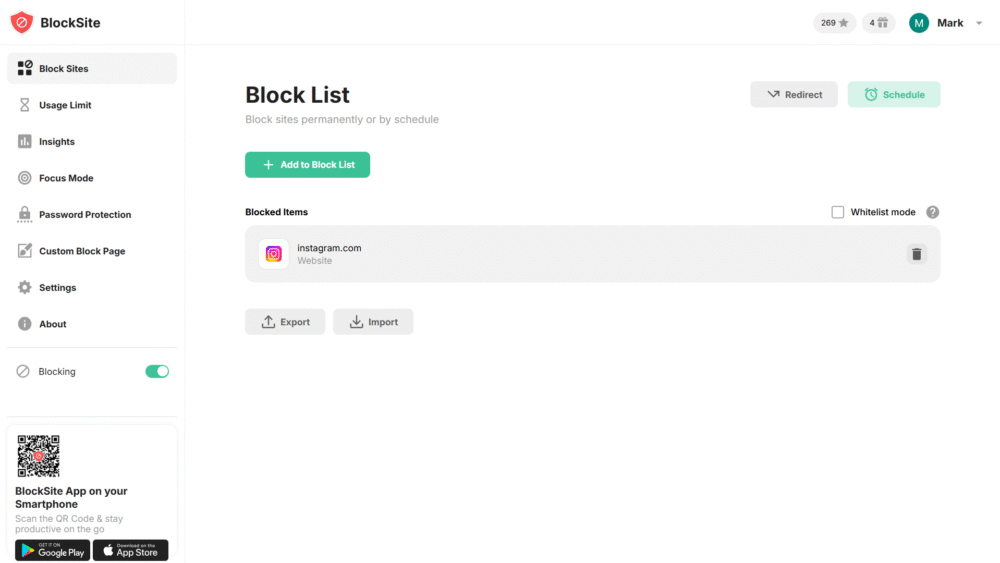
Here is a clean way to do it with BlockSite on desktop:
- Install the BlockSite browser extension on the browser you use most.
- Open the extension and go to your block list.
- Add Instagram’s main domain and related pages you want restricted.
- Save the rule and test it by opening Instagram in a new tab.
- Turn on password protection so changing settings takes effort.
- If you want stricter control, add a schedule so Instagram stays blocked during work, study, or bedtime hours.
- Repeat the setup on any other desktop browsers you use, especially if you tend to switch browsers when one route is blocked.
This is also where people ask how to block Instagram on Chrome. The steps are the same: install the extension, add Instagram to the block list, then add a password and schedule if you want stronger enforcement.
If you use more than one browser, consistency is important. BlockSite’s current feature set includes custom website blocking, schedules, focus sessions, password-protected settings, syncing across active devices, and the ability to keep the same rules where BlockSite is active.
How to block Instagram on iPhone
If your habit starts on your phone, the iPhone setup is more important than desktop. Many Instagram checks happen in short bursts, which is why blocking works best when it covers the obvious mobile access points.
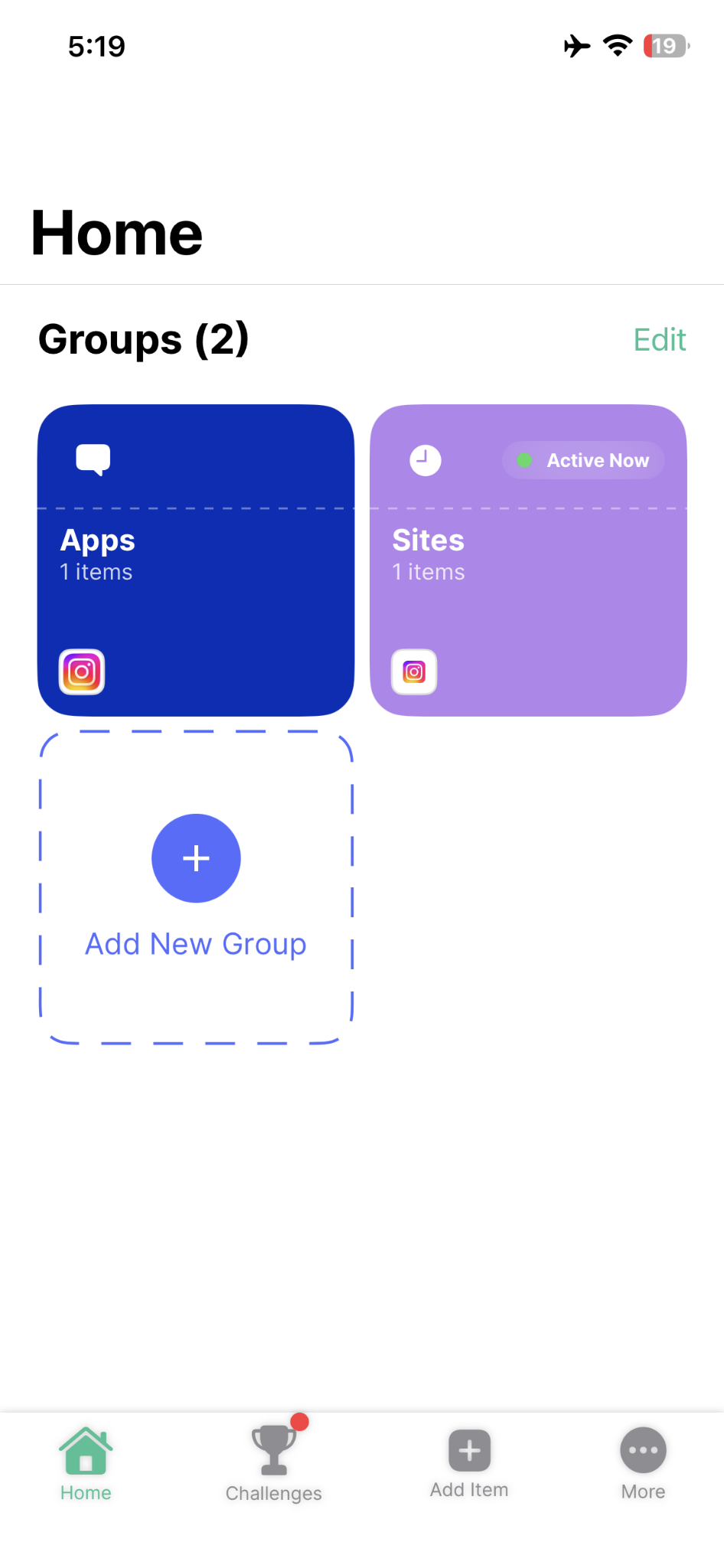
If you are trying to figure out how to block Instagram website on iPhone, use this setup with BlockSite:
- Install BlockSite on your iPhone.
- Complete the required setup permissions so the app can apply your rules properly.
- Add Instagram to your block list.
- Add the website version too, so Safari does not become the backup option.
- Set a schedule if you want Instagram unavailable during work blocks, school hours, bedtime, or other recurring windows.
- Turn on password protection if you want stronger self-control or parent control.
- Test both the app and the website to make sure both are covered on your device.
This setup is stronger than relying on willpower because it closes the two most common iPhone access points: the app and the browser version. It also makes it easier to block Instagram during the day without deleting your account or removing your phone from your life entirely.
How to block Instagram on Android
Android is often where the full habit pattern shows up most clearly: app opens, web links follow, notifications pull you back, then the cycle repeats. The best fix is to block both the app and the site version, then make it harder to reverse the rule.
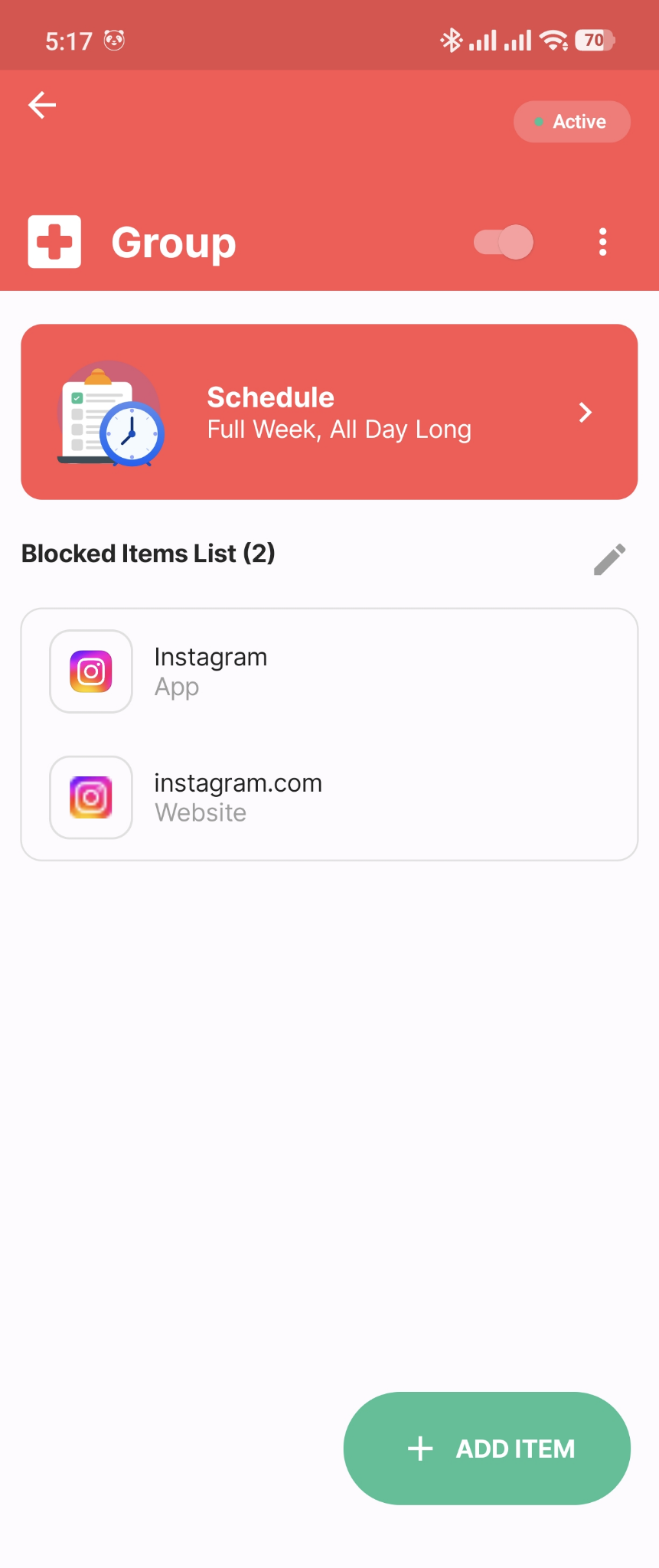
Use these steps with BlockSite on Android:
- Install BlockSite on your Android phone.
- Complete the setup prompts and permissions so blocking works reliably.
- Add Instagram to the app block list.
- Add Instagram’s website to the blocked list as well.
- Set your recurring schedule for the hours when you want the app unavailable.
- Turn on password protection if you tend to remove blocks impulsively.
- If needed, enable stricter enforcement options so uninstalling or editing settings is harder in weak moments.
Android habits are often app-first, but browser fallback is still common. Blocking both access points closes the easy workaround. Official BlockSite materials also describe app and website blocking on Android, along with stronger control options such as password protection and uninstall prevention.
A better way to take your time back
Instagram does not have to control your day. If it keeps interrupting work, draining attention, or eating into sleep, the answer is not more guilt. It is a clearer boundary. A good blocker puts one clear limit between you and the habit, then helps you keep that limit in place.
BlockSite is useful here because it does more than just block sites. It lets you block the app and website access points, set recurring schedules, use focus sessions, review patterns through insights, and add password protection when you need stronger follow-through. If you want a reliable way to spend less time on Instagram without deleting everything, it is a strong place to start. You can also look at productivity-focused tools and habits for the next step after blocking.
FAQ
How can I block Instagram on my computer permanently?
Use BlockSite on the desktop browser you use most, add Instagram to the block list, then turn on password protection so the settings are harder to change. If you use more than one browser, apply the same rule everywhere you browse, including any setup you use to block Instagram in Firefox.
Can I block Instagram temporarily during work hours?
Yes. Set a recurring schedule so Instagram is only unavailable during the hours that usually get derailed. That gives you control without forcing a full-time ban.
How do I block the Instagram app on iPhone?
Install BlockSite on the phone, finish setup permissions, add Instagram to your block list, and test that the block works. For stronger results, add the website version too so Safari does not become the easy fallback.
How can I block Instagram on Android without deleting the app?
Use BlockSite to block the Instagram app directly, then add the website version and apply a schedule if you want repeated control windows. This gives you restriction without removing the app from your phone.
Is it possible to block Instagram without using a third-party app?
Yes, but built-in options are usually more limited and may not cover every route as well. If your goal is simple self-control across app and web access, a dedicated blocker is usually easier to maintain.
Can I set a password to prevent myself from unblocking Instagram?
Yes. Password protection adds a delay between an impulse and a settings change, which is often enough to stop quick reversals. It is one of the most useful features for people asking, how to block Instagram from my devices period.
Does blocking Instagram also block the website version?
It can, if you add the website domain to your block list. That step matters because many people reopen Instagram in the browser after blocking only the app.
Can parents block Instagram on their child’s device?
Yes. Parents can use BlockSite to restrict access, add schedules for school and sleep hours, and reduce the chance that a child simply turns the block off. Password protection makes that setup stronger.
Will Instagram notify someone if I block access on my device?
No. Blocking access on your own phone, tablet, or computer is a local device setting. It does not send a notice to other Instagram users.
How do I unblock Instagram later if I change my mind?
Open BlockSite, remove Instagram from the block list, or edit the schedule you created. If you used password protection, you will need that password before making changes.


 Take back your focus